Clover's Creative Control#
This is a set of tools to let additional hardware devices integrate with creative applications on a Mac device. Additionally, this repo contains a lot of my own tools and scripts I use in the Music/Video creative processes.
In addition to the primary keybinding system and personal software
configurations, this project can be used as a library to use the control
primitives directly (either to build your own hardware integrations, or to
control the software). This can be done by installing this repo as a pnpm git
dependency in your project.
NOTE: These tools only work on macOS. I don't have interest in maintaining other configurations.
Hardware#
TODO:
- generic keyboard / karabiner elements integration?
- custom trackpad integration?
DaVinci Resolve Speed Editor#
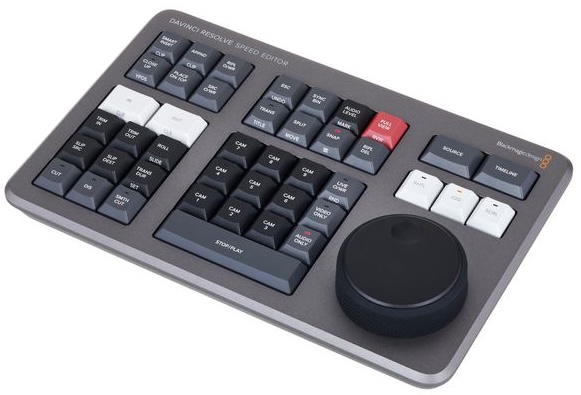
A $300 bundle containing Fusion Studio and the control surface, it's a great deal. There is a large, high resolution knob, as well as many keys with some having lights. This repo includes an SDK to reprogram it to be useful in any program.
Software#
TODO:
- Fusion
- Blender?
- Krita?
- The Finder
- QuickTime player
macOS (Mac.ts)#
Bind to the Mac desktop interface.
const mac = await Mac.open();

mac.on("app-change", (bundle) => {
  console.info("Current App: " + bundle);
});
REAPER#
With the help of an OSC extension, REAPER can be controlled with TypeScript.
import { Reaper } from "@clo/creative-control/Reaper.ts";

const reaper = new Reaper();
reaper.on("transport", (transport) => {
  console.info(
    transport.recording
      ? "You are recording"
      : transport.playing
      ? "Playing"
      : "Stopped",
  );
});
Setup:
- Start up Clover Creative Control /
new Reaper() - Navigate to REAPER Settings (
Cmd+,) - Click
Control/OSC/webon the left side panel - Press
Add- Control surface mode:
OSC (Open Sound Control) - Device name:
Clover Automation - Pattern config:
CloverAutomation - Mode:
Configure device IP+local port- Device port:
58001 - Device IP:
127.0.0.1 - Local listen port:
58000 - Local IP: (default)
- Device port:
- Allow binding messages to REAPER actions and FX learn
- Control surface mode:
Config Format#
The main entrypoint loads config files from ./config, which each apply to one
application. In this example, it configures Reaper to integrate with the Speed
Editor. The provided instance of hardware devices are wrapper objects that apply
the binds only when the program is active. This way, there aren't situations
with multiple readers conflicting.
import * as config from "#config";
import { Reaper } from "@clo/creative-control/Reaper.ts";

export default config.forApp("com.cockos.reaper", ({ speededitor, mac }) => {
  const reaper = new Reaper();

  // Sync state to LEDs
  reaper.on("transport", (transport) => {
    speededitor.leds.audioOnly = transport.recording;
  });

  // Keyboard Actions
  speededitor.onPress("stopPlay", () => {
    reaper.runAction("transport-play-stop");
  });
  speededitor.onPress("audioOnly", () => {
    reaper.runAction("transport-record");
  });
});