@foxxmd/logging#




A typed, opinionated, batteries-included, Pino-based logging solution for backend TS/JS projects.
Features:
- Fully typed for Typescript projects
- One-line, turn-key logging to console and rotating file
- Child (nested) loggers with hierarchical label prefixes for log messages
- Per-destination level filtering configurable via ENV or arguments
- Clean, opinionated log output format powered by pino-pretty:
- Colorized output when stream is TTY and supports it
- Automatically serialize passed objects and Errors, including Error Cause
- Automatically redact current working directory from log output
- Bring-Your-Own settings
- Add or use your own streams/transports for destinations
- All pino-pretty configs are exposed and extensible
- Build-Your-Own Logger
- Don't want to use any of the pre-built transports? Leverage the convenience of @foxxmd/logging wrappers and default settings but build your logger from scratch
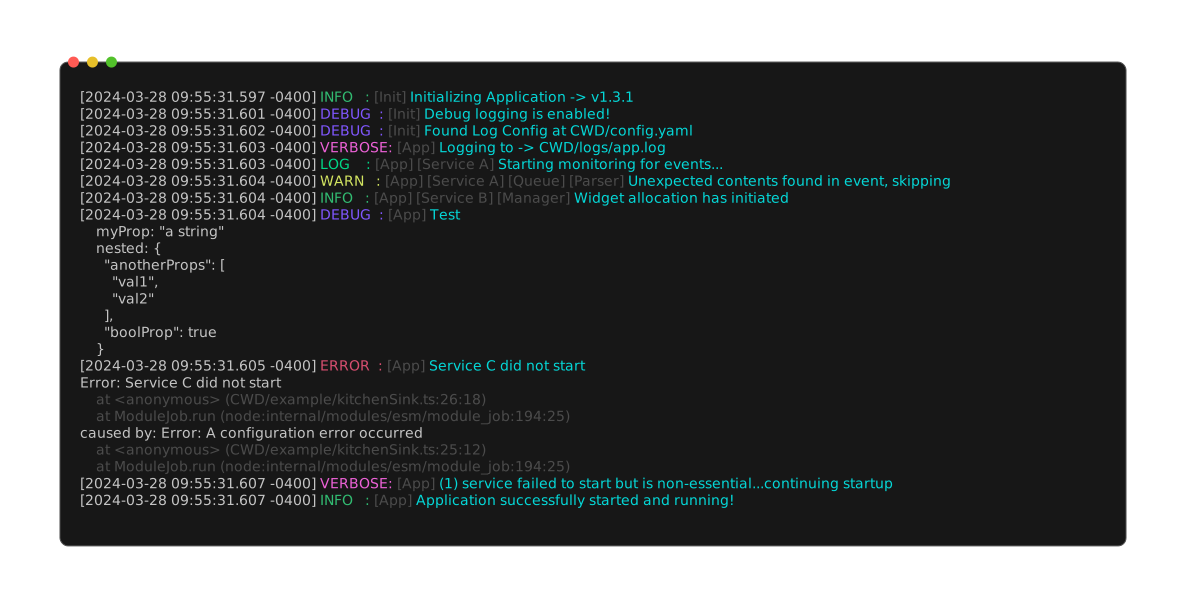
Documentation best viewed on https://foxxmd.github.io/logging
Install#
npm install @foxxmd/logging
Quick Start#
import { loggerAppRolling, loggerApp } from "@foxxmd/logging";

const logger = loggerApp();
logger.info('Test');
/*
 * Logs to -> console, colorized
 * Logs to -> CWD/logs/app.log
 *
 * [2024-03-07 10:31:34.963 -0500] DEBUG: Test
 * */


// or for rolling log files we need to scan logs dir before opening a file
// and need to await initial logger
const rollingLogger = await loggerAppRolling();
rollingLogger.info('Test');
/*
 * Logs to -> console, colorized
 * Logs to daily log file, max 10MB size -> CWD/logs/app.1.log
 *
 * [2024-03-07 10:31:34.963 -0500] DEBUG: Test
 * */
Loggers#
The package exports 4 top-level loggers.
App Loggers#
These are the loggers that should be used for the majority of your application. They accept an optional configuration object for configuring log destinations.
loggerApp- Logs to console and a fixed file destinationloggerAppRolling- Logs to console and a rolling file destination
Helper Loggers#
These loggers are pre-defined for specific use cases:
loggerDebug- Logs ONLY to console at minimumdebuglevel. Can be used during application startup before a logger app configuration has been parsed.loggerTest- A noop logger (will not log anywhere) for use in tests/mockups.
Configuring#
The App Loggers take an optional config object LogOptions:
interface LogOptions {
  /**
   *  Specify the minimum log level for all log outputs without their own level specified.
   *
   *  Defaults to env `LOG_LEVEL` or `info` if not specified.
   *
   *  @default 'info'
   * */
  level?: LogLevel
  /**
   * Specify the minimum log level streamed to the console (or docker container)
   * */
  console?: LogLevel
  /**
   * Specify the minimum log level to output for files or a log file options object. If `false` no log files will be created.
   * */
  file?: LogLevel | false | FileLogOptions
}
Available LogLevel levels, from lowest to highest:
debugverboseloginfowarnerrorfatalsilent
const infoLogger = loggerApp({
 level: 'info' // console and file will log any levels `info` and above
});

const logger = loggerApp({
  console: 'debug', // console will log `debug` and higher
  file: 'warn' // file will log `warn` and higher
});
file in LogOptions may also be an object that specifies more behavior.
Additional App Logger Configuration#
loggerApp and loggerAppRolling accept an optional second parameter, LoggerAppExtras that allows adding additional log destinations or pino-pretty customization:
export interface LoggerAppExtras {
  /**
   * Additional pino-pretty options that are applied to the built-in console/log streams (including CWD redaction)
   * */
  pretty?: PrettyOptionsExtra
  /**
   * Additional logging destinations to use alongside the built-in console/log stream. These can be any created by buildDestination* functions or other Pino Transports
   * */
  destinations?: LogLevelStreamEntry[]
  /**
   * Additional Pino Log options that are passed to `pino()` on logger creation
   * */
  pino?: PinoLoggerOptions
}
Some defaults and convenience variables for pino-pretty options are available in @foxxmd/logging/factory prefixed with PRETTY_. See factory variables docs for all options.
An example using the extras parameter:
import { loggerApp } from '@foxxmd/logging';
import {
    PRETTY_ISO8601, // replaces standard timestamp with ISO8601 format
    buildDestinationFile
} from "@foxxmd/logging/factory";

const warnFileDestination = buildDestinationFile('warn', {path: './myLogs/warn.log'});

const logger = loggerApp({}, {
   destinations: [warnFileDestination],
   pretty: {
     translateTime: PRETTY_ISO8601
   }
});
logger.debug('Test');
// [2024-03-07T11:27:41-05:00] DEBUG: Test
See Building A Logger for more information.
Colorizing Docker Logs#
Color output to STD out/err is normally automatically detected by colorette or can manually be set using colorize anywhere PrettyOptions are accepted. However docker output can be hard to detect as supporting colorizing, or the output may not be TTY at the container interface but is viewed by a terminal or web app that does support colorizing.
Therefore @foxxmd/logging will look for a COLORED_STD environmental variable and, if no other colorize option is set and the ENV is not empty, will use the truthy value of this variable to set colorize for any buildDestinationStdout or buildDestinationStderr transports. This includes the built-in stdout transports for loggerApp and loggerAppRolling.
Thus you could set COLORED_STD=true in your Dockerfile to coerce colored output to docker logs. If a user does not want colored output for any reason they can simply override the environmental variable like COLORED_STD=false
Usage#
Child Loggers#
Pino Child loggers can be created using the childLogger function with the added ability to inherit Labels from their parent loggers.
Labels are inserted between the log level and message contents of a log. The child logger inherits all labels from all its parent loggers.
childLogger accepts a single string label or an array of string labels.
import {loggerApp, childLogger} from '@foxxmd/logging';

logger = loggerApp();
logger.debug('Test');
// [2024-03-07 11:27:41.944 -0500] DEBUG: Test

const nestedChild1 = childLogger(logger, 'First');
nestedChild1.debug('I am nested one level');
// [2024-03-07 11:27:41.945 -0500] DEBUG: [First] I am nested one level

const nestedChild2 = childLogger(nestedChild1, ['Second', 'Third']);
nestedChild2.warn('I am nested two levels but with more labels');
// [2024-03-07 11:27:41.945 -0500] WARN: [First] [Second] [Third] I am nested two levels but with more labels

const siblingLogger = childLogger(logger, ['1Sib','2Sib']);
siblingLogger.info('Test');
// [2024-03-07 11:27:41.945 -0500] INFO: [1Sib] [2Sib] Test
Labels can also be added at "runtime" by passing an object with labels prop to the logger level function. These labels will be appended to any existing labels on the logger.
logger.debug({labels: ['MyLabel']}, 'My log message');
Serializing Objects and Errors#
Passing an object or array as the first argument to the logger will cause the object to be JSONified and pretty printed below the log message
logger.debug({myProp: 'a string', nested: {anotherProps: ['val1', 'val2'], boolProp: true}}, 'Test');
 /*
[2024-03-07 11:39:37.687 -0500] DEBUG: Test
  myProp: "a string"
  nested: {
    "anotherProps": [
      "val1",
      "val2"
     ],
   "boolProp": true
  }
  */
Passing an Error as the first argument will pretty print the error stack including any causes.
const er = new Error('This is the original error');
const causeErr = new ErrorWithCause('A top-level error', {cause: er});
logger.debug(causeErr, 'Test');
/*
[2024-03-07 11:43:27.453 -0500] DEBUG: Test
ErrorWithCause: A top-level error
    at <anonymous> (/my/dir/src/index.ts:55:18)
caused by: Error: This is the original error
    at <anonymous> (/my/dir/src/index.ts:54:12)
 */
Passing an Error without a second argument (message) will cause the top-level error's message to be printed instead of log message.
Building A Logger#
All the functionality required to build your own logger is exported by @foxxmd/logging/factory. You can customize almost every facet of logging.
A logger is composed of a minimum default level and array of objects that implement StreamEntry, the same interface used by pino.multistream. The only constraint is that your streams must accept the same levels as @foxxmd/logging using the LogLevelStreamEntry interface that extends StreamEntry.
import {LogLevelStreamEntry} from '@foxxmd/logging';
import { buildLogger } from "@foxxmd/logging/factory";

const myStreams: LogLevelStreamEntry[] = [];
// build streams

const logger = buildLogger('debug', myStreams);
logger.debug('Test');
factory exports several "destination" LogLevelStreamEntry function creators with default configurations that can be overridden.
import {
    buildLogger,
    buildDestinationStream,     // generic NodeJS.WriteableStream or SonicBoom DestinationStream
    buildDestinationStdout,     // stream to STDOUT
    buildDestinationStderr,     // stream to STDERR
    buildDestinationFile,       // write to static file
    buildDestinationRollingFile // write to rolling file
} from "@foxxmd/logging/factory";
All buildDestination functions take args:
level(first arg) - minimum level to log atoptions(second arg) - an object extendingpino-prettyoptions,PrettyOptions
options inherits a default pino-pretty configuration that comprises @foxxmd/logging's opinionated logging format. The common default config can be generated using prettyOptsFactory which accepts an optional PrettyOptions object to override defaults:
import { prettyOptsFactory } from "@foxxmd/logging/factory";

const defaultConfig = prettyOptsFactory();

// override with your own config
const myCustomizedConfig = prettyOptsFactory({ colorize: false });
Pre-configured PrettyOptions are also provided for different destinations:
import {
  PRETTY_OPTS_CONSOLE, // default config
  PRETTY_OPTS_FILE     // disables colorize
} from "@foxxmd/logging/factory";
Specific buildDestinations also require passing a stream or path:
buildDestinationStream must pass a NodeJS.WriteableStream or SonicBoom DestinationStream to options as destination
import {buildDestinationStream} from "@foxxmd/logging/factory";

const myStream = new WritableStream();
const dest = buildDestinationStream('debug', {destination: myStream});
buildDestinationStdout and buildDestinationStderr do not require a destination as they are fixed to STDOUT/STDERR
buildDestinationFile and buildDestinationRollingFile must pass a path to options
import {buildDestinationFile} from "@foxxmd/logging/factory";

const dest = buildDestinationFile('debug', {path: '/path/to/file.log'});
Example#
Putting everything above together
import {
  buildDestinationStream,
  buildDestinationFile,
  prettyOptsFactory,
  buildDestinationStdout,
  buildLogger
} from "@foxxmd/logging/factory";
import { PassThrough } from "node:stream";

const hookStream = new PassThrough();
const hookDestination = buildDestinationStream('debug', {
  ...prettyOptsFactory({sync: true, ignore: 'pid'}),
  destination: hookStream
});

const debugFileDestination = buildDestinationFile('debug', {path: './myLogs/debug.log'});
const warnFileDestination = buildDestinationFile('warn', {path: './myLogs/warn.log'});

const logger = buildLogger('debug', [
  hookDestination,
  buildDestinationStdout('debug'),
  debugFileDestination,
  warnFileDestination
]);
hookStream.on('data', (log) => {console.log(log)});
logger.debug('Test')
// logs to hookStream
// logs to STDOUT
// logs to file ./myLogs/debug.log
// does NOT log to file ./myLogs/warn.log
Parsing LogOptions#
If you wish to use LogOptions to get default log levels for your destinations use parseLogOptions:
import {parseLogOptions, LogOptions} from '@foxxmd/logging';

const parsedOptions: LogOptions = parseLogOptions(myConfig);