Restray#
Restray is a powerful but friendly backup program, powered by restic, that runs in your tray. Supports multiple profiles and quite a bit of configuration, along with other features (see feature list below). Runs on MacOS, Windows, and Linux.
You can also configure Restray to use rustic instead, but please keep in mind that rustic support is currently experimental.
I needed a replacement for Time Machine, since it's painfully slow, only exclusive to Macs, and only supports SMB now. I quite like it's simplicity and ease-of-use though. Looking for other solutions, restic appeared to be a great fit, and I already use it for my server. However, I didn't find any option for scheduling restic backups that I actually liked. I did see resticprofile which looks cool, and may be a better solution for some, please do check it out! But I'd still prefer a simple GUI personally. So... here's Restray which should hopefully solve that :)
This is new and somewhat work-in-progress/beta software. You might possibly encounter a bug or two that I haven't fixed yet, and if so, please make an issue. I don't intend on adding many new features now, but I will fix bugs and work to refine the UX over time.
| MacOS | Linux | Windows |
|---|---|---|
 |
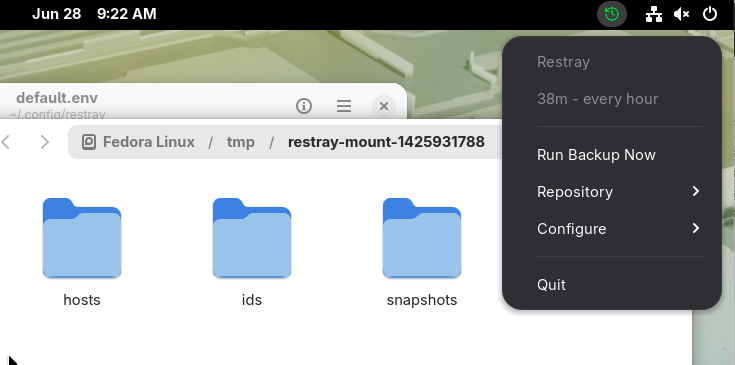 |
 |
Features#
- Initialize a repository if one doesn't already exist
- Run backups on a schedule with cron expressions, or run the full schedule manually
- Can detect battery power too and temporarily disable schedule
- Multiple backup profiles with different schedules and different settings
- Optional automatic pruning and checks after backups
- Operations menu for running individual operations (backup, prune, check, unlock, mount, shell, hooks)
- Optional automatic retry and removal of stale locks
- On Windows/Linux it can also download and update it's own self-managed restic if not found in PATH
- Open a shell with your profile's environment and restic binary loaded, for restoring or other CLI operations without friction
- Mount repository snapshots on macOS/Linux
- Requires FUSE-T or macFUSE on macOS. Requires FUSE on Linux
- I'd recommend something like restic-browser to browse on Windows, or just open the Shell and use the CLI
- Full Disk Access detection and prompt on macOS
- Config file hot-reloading
- Can run headless as CLI or daemon, not just the tray GUI
Installation#
Please keep in mind that Restray is currently beta software. I work on it in my free time. It's new, and there may be a bug or two that I haven't caught yet. If you find any, please create an issue so that I can keep track of it.
To install, grab a build artifact for your OS and architecture from the repository's tags. On MacOS you'll need to remove quarantine from the .app, since I can't pay Apple $100/year to sign it. Sorry.
On macOS, latest restic/rustic backends are bundled into the .app at build time. On Windows and Linux, Restray can download and update the backend. If you install the backend to your path, e.g. with your package manager, it is preferred over the self-managed binary.
If you're a Nix/NixOS/Nix-darwin user, I also provide package/module in the project's flake for Linux and MacOS.
If you're on GNOME, you will need the system tray support extension to see and interact with Restray.
Building from source#
On Nix(OS)/nix-darwin, run nix build (or add this repo to your flake and simply install the package). Otherwise, install the dependencies from flake.nix's devshell and run just build or just package. Both default to your current platform. You can also pass a target to cross-compile (e.g. just build linux amd64, just package windows).
CLI / daemon#
Restray also works without the GUI on MacOS/Linux. Run restray daemon to run just the built-in scheduler (no tray GUI), or use one-shot commands for other things. Run restray --help for the full command list.
Linux users/packagers: systemd unit files are included (packaging/linux/restray.service for system-wide, packaging/linux/restray-user.service for per-user). If you use NixOS, a services.restray module is also exported from the flake :)
For Linux system-wide setups, you can run commands against the same config/state as the system service with restray --system ..., or explicitly with restray --config /etc/restray --state /var/lib/restray .... This is useful for manually running operations using the system-wide config. You will need to have elevated priviledges though (run with sudo)
Configuration#
[gui]#
GUI-only settings, ignored by restray daemon.
| Key | Type | Default | Description |
|---|---|---|---|
check_updates |
bool | true |
MacOS/Windows only. Check for new Restray versions on startup and periodically. When an update is found, the version item in the menu changes to an update button |
manage_backend |
bool | false |
Windows/Linux only. If the selected backend is not found in PATH, automatically self-manages it's binary from GitHub. |
notifications |
string | "none" |
"all" (success + errors), "errors" (errors only), or "none" (silent) |
icon |
string | platform | "color", "mono", "white", or "black". Default is "mono" on MacOS/Windows and "color" elsewhere. "mono" follows OS light/dark mode. |
schedule_display |
string | "description" |
"description" (human-readable, e.g. "every 6 hours"), "cron" (raw expression, e.g. "0 * * * *"), "last" (time since last backup, e.g. "2 hours ago"), or "none" |
terminal |
string | "" |
MacOS/Linux only. Terminal emulator used in "Shell" and "View Log". |
[[profiles]]#
You can create multiple of these [[profiles]] sections for separate backup targets. Each profile has its own schedule, repository, environment, etc.
| Key | Type | Default | Description |
|---|---|---|---|
name |
string | "default" |
Name for the profile |
backend |
string | "restic" |
"restic" or "rustic". Do not change unless you know what this does. |
env_file |
string | <config_dir>/<name>.env |
Path to the environment file with RESTIC__, RUSTIC__, etc |
rclone_config_file |
string | "" |
Path to an rclone config file, set as RCLONE_CONFIG. When using an rclone: repository |
retry_lock |
string | "2m" |
How long to retry acquiring a repository lock (e.g. "5m", "30s"). Will automatically attempt to clear stale locks after this timeout. Set to "0" to disable |
pre_hook |
string | "" |
Shell command to run before a scheduled run. Inherits the profile's environment and backend binary. |
post_hook |
string | "" |
Shell command to run after a scheduled run. Inherits the profile's environment and backend binary. |
Hooks receive the following environment variables when run as part of a schedule:
| Variable | Description |
|---|---|
RESTRAY_PROFILE |
Name of the active profile (always set, including manual runs) |
RESTRAY_OPERATIONS |
Comma-separated list of operations enabled in the schedule (e.g. backup,prune,check) |
RESTRAY_SCHEDULED |
true |
RESTRAY_ERROR |
Error message if the schedule failed; unset on success (post-hook only) |
[profiles.schedule]#
| Key | Type | Default | Description |
|---|---|---|---|
cron |
string | "" |
Set to an empty string to disable the schedule entirely. Cron expression for profile schedule (for help, see crontab.guru) |
on_battery |
bool | false |
Whether to run schedule while on battery power |
backup |
bool | true |
Run backup on schedule |
prune |
bool | false |
Run prune on schedule |
check |
bool | false |
Run check on schedule |
[profiles.backup]#
| Key | Type | Default | Description |
|---|---|---|---|
paths |
string[] | [] |
Paths to back up, e.g. ["/Users/user/Documents", "/home/user/Projects"] |
args |
string[] | ["--exclude-caches", "--exclude", "*.tmp"] |
Extra arguments passed to backup |
args_scheduled |
string[] | ["--tag", "scheduled"] |
Extra arguments appended (not replaced) to backup when running from schedule |
[profiles.prune]#
| Key | Type | Default | Description |
|---|---|---|---|
args |
string[] | ["--keep-last", "4", "--keep-hourly", "24", "--keep-daily", "7", "--keep-weekly", "4", "--keep-monthly", "12"] |
Extra arguments passed to forget --prune |
[profiles.check]#
| Key | Type | Default | Description |
|---|---|---|---|
args |
string[] | [] |
Extra arguments passed to check |
[profiles.mount]#
| Key | Type | Default | Description |
|---|---|---|---|
args |
string[] | [] |
Extra arguments passed to mount |
Credits#
Wouldn't have been possible without:
Inspirations and cool things:
- codeberg.org/wouterg/restictray - main initial inspiration for Restray, but I wanted Windows support and other features to make it more user-friendly
- github.com/creativeprojects/resticprofile - some ideas from here were adapted into Restray
- github.com/garethgeorge/backrest - another great project, check it out
Libraries used:
- github.com/fyne.io/systray - cross-platform system tray handler
- github.com/BurntSushi/toml - parse TOML
- github.com/distatus/battery - battery status for schedule
- github.com/fsnotify/fsnotify - hot-reloading
- github.com/gen2brain/beeep - cross-platform notification handler
- github.com/robfig/cron - cron scheduler
- github.com/dustin/go-humanize - human-readable relative timestamps
- github.com/lnquy/cron - human-readable cron expressions
- github.com/thiagokokada/dark-mode-go - dark mode detection for icons
- github.com/urfave/cli - cli library
- github.com/google/shlex - shell-word splitting for web editor